Open topic with navigation
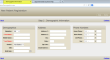
Demographic Information
- Complete the information on the Demographic Information screen according to the following descriptions and definitions.
The only fields that are absolutely required are your First Name and Last Name. Keep in mind, however, that you are registering as a new patient as well as a portal user. The more information that you provide, the smoother your registration process will be, and when you make appointment requests, the easier your care provider will be able to identify you and process your requests.
- Click the Continue link once you have finished to proceed to the Initial Questionnaire portion of the registration.
Demographics
Salutation: Click the drop-down and select from the options provided.
First Name: Enter the first name of the patient, up to 40 characters. This field is required.
Middle Name: Enter the middle name of the patient, up to 40 characters.
Last Name: Enter the last name of the patient, up to 40 characters. This field is required.
Gender: Click the drop-down menu and select the option appropriate for the patient.
SSN: Enter the patient's social security number.
Birth Date: Type the birth date in the field provided using mm/dd/yyyy format, or click the calendar button at the end of the field and select the date graphically.
Address
Address 1: Enter the patient’s address (40 characters per line).
Address 2: Enter the patient’s address (40 characters per line).
Zip Code: Enter the patient’s zip code.
City: Enter the city (20 characters).
State: Enter standard 2-digit abbreviation.
Email: Enter the patient’s email address, if available, up to 50 characters. If you have a valid email, please enter it. The Patient Portal utilizes email as a key means of communication between the patient and care provider.
Phone Numbers
Home Phone: Enter a standard 10-digit phone number with the option of adding an extension up to 5 digits.
Work Phone/Cell/Fax: See Home Phone.
Copyright © 2014 Mediware® Information Systems, Inc.